Categories
Hardware Software

Oculus Rift VR

Jack in, it’s cyber-time.  Seriously though if you are still reading, I squeezed on the Rift $399 bundle with touch that went active last week.  I want to describe the experience of moving through a virtual environment and seeing your hands map in that realm, as to in reality, but it’s really something you have to try to get full appreciation of.  I’m going to overview the hours I spent in so far, using Oculus software, enabling SteamVR and also some games and titles.

2017-08-17 Edit:
I wanted to mention Oculus Tray Tool and setting Super Sampling.  I have since upgraded my GPU to a 1080 Ti and am running Super Sampling @ 1.5.  Oculus Tray Toll will also let you disable USB auto power save in one click and also give you access to Visual HUD Overlays / debugging options.  The super sampling really cleans up the image quality to try and mitigate screen door effect / seeing pixels obviously.
/edit

Primer here.  You need a computer of comparable performance to drive the display of your Rift headset.  I see a recommended spec of an Intel i5-45xx series processor / CPU and Nvidia 970 or higher for your video card / GPU.  I recently built up an i7-7700k w/ 980 GTX build and it has performed extremely well in VR, without frame rate slowdown.
Your VR headset uses 1 HDMI and 1 USB connection, with the HDMI going directly into your video card.  In my case, I already had my external display on DisplayPort.  As the 980 GTX (and most recent cards from what I have seen) have 1 HDMI and the rest of ports are DisplayPort, you want to make sure your primary monitor is not using that HDMI output on the GPU / Video Card.

Additional hardware setup will be calibrating your spacial sensors, syncing any controllers and of course installing the Oculus software.  Fair warning that Windows 8.1 seems to be the baseline and there are some games that require Windows 10.  I’m on Windows 10 and wanted to warn you in advance, especially if you are still main-lining Windows 7.  Most important of all, you need physical space to play the Rift.
There are a few sitting compatible games I have found, but the more explorational titles are going to need you to have at least a 3 x 3 foot area clear.  From the center of your area, you will need to fully extend your arms to the side without being restricted.  Movement depth is less relevant but also important.  Some titles actually need you to be able to move back significantly far (as in around 7 feel away from the sensors).  I have so far tested in a 3 x 3 area, as I would need to use the living room for the deeper dimensions.  Since I picked up the Rift and Touch combo, I have 2 physical sensors installed.  1 came with the Oculus headset and the other came with the touch sensors.

I mentioned some of the contents but what you can expect to unbox are:

  • 1x Oculus Rift headset
  • 1x Sensor bar.  It looks like a small camera.  I suspect it works off Infrared similar to the Wii and Kinect devices.
  • 1x Xbox One gamepad, USB dongle and extension cable.
  • 1x Oculus remote.
  • 2x AA batteries for the Xbox gamepad.
  • 2x Oculus Touch controllers.
  • 2x AA batteries. 1 for each Touch controller.
  • 1x Oculus sensor

Once you clean up a space for you to move in VR without falling IRL, your first step after trying the tutorials (FYI: you can repeat these @ any time by clicking them in the desktop Oculus application, under your Library tab.), will be to get used to recalibrating center.  This will be most appropriate when changing from standing or sitting play.  In Steam you will get to the system menu by Right controller Menu button.  There you will see a re-center calibration.  If you are sitting, set your height to approx where your head is from the ground.  I find 42 inches (3 ft 6 inches) works well for sitting.  Some of this will need you to interact with Windows desktop for the height adjustment.
If you load SteamVR and are below the ground, you need to change your height settings.
Similarly in Oculus VR, the Right controller Menu button gives you a similar option to re-calibrate center.  For height adjustment in Oculus, you’ll want to go to Settings | Devices | Configure Rift to change your height.  You should be able to pick the re-center option without taking your VR goggles off, as with Steam as well.

Next post will cover some applications run in VR.

Most of these are on both the Steam Store and Oculus Store.  I started in the Oculus store, until I was able to get SteamVR ruining.  To get SteamVR to work you need to click the Gear icon for Settings on the desktop program, then click General.  On this screen, enable the button for Unknown Sources.  Once you do this, SteamVR will be able to interact with the Oculus gear, as before setting this option, Steam will say it cannot find your headset and accessories.

You will need to load SteamVR from your desktop, until or unless you enable the following mod to create a steam icon.  In that guide, you are downloading a VR film, replacing the executable with a batch modified exe that loads SteamVR and also replacing some image files to show the tile in VR.  Hack fun hacking up some custom icons with the info from that guide.  It’s fairly easy to follow and you will then be able to launch SteamVR from within the Oculus VR environment.

I’m starting a little backwards describing my exploration but one of my main objectives was to interact with my desktop OS in VR.  Steam handles this by selecting Desktop when you press the left menu button on a Touch pad.  This will get you back to your actual (likely Windows) OS.  I was browsing the twitter and reading email in VR.  It’s a wild way to have a huge super desktop, while also letting you interact with VR games that launch from Desktop.  Steam has a few of these but I have not encountered any in Oculus VR yet.
Kickass.  Speaking of interacting with my desktop, I also wanted to try to see if I can open and manage files in a 3D realm.  I can indeed open images, movies and music by using AVOlight.Space (Multi-Screen Media Player).  The free download lets you load one screen and puts a watermark on each additional screen you load.  This can be removed by buying the $9.99 DLC content to unlock the program.  Seeing how it worked made it a no-question for me.  This app has slideshow support, music and video controls, image rounding options along with depth perception to toggle zoom and placement of your displays.  If you want to view some files in multiple windows, this is the jam.

Google Earth VR is a free download that allows you to browse Google Maps in 3D.  If you ever switched visual modes and saw the tracking of depth for images, you will certainly see how the landscape is mapped as a rendered world with relative height and depth.  This is pretty impressive to zoom and fly around in, granted I was moderate in controlling well the little I played in it.  There are also area tours you can load up and enjoy, in the event you do not have any good ideas on where to search and visit.  I wonder how restricted areas map.  I’ll let you know on that one, since they are normally blurred out.  Hopefully it doesn’t clip us out of the map.  In this case, I was using the touch controllers as my primary input.  Sitting compatible.

Lucky’s Tale. Included platformer game with some good level design.  Graphics are cutesy like a Spiro-like game.  You have height obstacles world maps that surround you.  I was playing with the Touch controllers but this one appears to be designed for the gamepad / Xbox controller.

Oculus First Contact. This is likely the demo you play upon configuring your Rift.  A very immersive interactive demo.  I was mind blown in there and immediately suggested someone else try it too.  Great demonstration and interactive guide on using Rift and Oculus.  This is also listed in Tutorials as Touch Tutorial Complete.

Oculus Dream Deck. A video demo of a few oculus applications.  Be sure to spin around and enjoy the world map, as the case with anything else you play.

Makebox. A slick pixel editor.  I watched a video of someone giving a tutorial and was sold.  I have to try and make some dank pixel art as well.

Darkness Rollercoaster. Sitting rollercoaster ride.  Cool immersion and depth objects used.

Rick and Morty: Virtual Rick-ality.  Very cool game that is a little difficult but rewarding.  The VR design and implementation is quite good. You may find yourself restricted in a 3×3 foot space but can re-calibrate center to accommodate this.  Crude humor and interesting use of environments.  I have been playing this for a few hours and it is a standing title, as you are doing quite a bit of exploring and reaching down.  I bought it on Steam, largely to test streaming functionality.  I can say the streaming rooms do work in SteamVR.  I finished this tonight in about 5 hours of playtime.
Be warned this game is designed for a Roomscale setup.  That being a deeper area to walk around in.

Oculus Medium. Very robust  image editing and world tool.  You can save and export materials.  Fun object creation and manipulation or a clay-like substance.

Mission ISS. This is a VR space simulator.  You can pivot around the spaceship and enjoy the view.

Blocks by Google. Another image editor in a 3D space.  Easel is your right hand where your drawing tool is the left one.

Preta: Vendetta Vising. This is a dungeon crawler game with multiplayer either coming or available after you complete the chapter 1 missions.  I have an hour or two into this game.  There are 3 character classes to pick from at start and some tutorials that keep you in a level environment.  I was reserved on the quality of until I got to see some of the actual dungeons.  The level design layering and depth is pretty impressive.  Town is pretty close to most MMO-like RPGs.  Quest NPC in Town, Skill up trainer, shops, etc.  You get a bonus for early pre-release stuff but there is also a RMT item system.  That’s a flag for performance down the line on growth. In other words, it may get very grindy of a game to encourage buying into currency boosts.

Sketchbox. VR prototyping platform.  Really cool for prototyping a 3D environment.  I’m going to try and import some 3D videos and do a mock-up environment.  Especially if you want to make a VR application, mock it up in here on the swift.

EVE: Valkyrie .  This is a flying space game.  The controls seemed tight but it was fun for a space shooter.

Sports Bar VR. Standing game that I played last night.  Darts, Air Hockey and Pool are available.  I only played single player but it does feature online and lobbies.

The Climb. Standing game that I played about 2 minutes of due to sitting at the time of night when I tried it.

I will add more info about the last 2 games when I play them in a standing mode.  This is what I got to explore so far.  Some content is free and steam also appears to have some demos on there,  I purchased the following or got them in a sale promo:

  • Rick and Morty: Virtual Rick-ality: $30
  • AVOlight.Space. Free single display.  Unlock multiple for $10
  • EVE: Valkyrie. Free with Summer of Rift Promo.  Typically $40
  • Makebox. $10
  • Preta: Vendetta Rising. $35
  • Darkness Rollercoaster. $2
  • Oculus Adventure Pack: Includes for $70
    The Climb
    Raw Data
    SportsBar VR
    I Expect You To Die
  • Lucky’s Tale. Included with your Rift purchase.I also decided to pickup a 3rd sensor for better tracking when playing roomscale games. This is especially relevant when turning around and away from your desktop / front sensors. Adding the 3rd sensor will wrap you completely in motion tracking. I saw this when playing Rick and Morty and mitigated it using the recalibrate center steam menu option (that also is in the Rift menu).

    I forgot to mention I got the $399 bundle by going to a Best Buy store and getting the Rift and Touch packages.  When rung up at the register, it will be at the Promo rate and you’ll get the Oculus store coupon for your free copy of EVE: Valkyrie on the receipt.  I have heard and seen that Amazon is pending more inventory, so head to a store and grab a kit if you don’t want to wait.  Make sure they actually have ’em in stock, as I got the next-to-last headset last Saturday at a local store.

    I did not see anywhere with the stand-alone sensors in stock so I ordered one from Amazon.  They are also out of stock with no indicated restock date.  I’m looking forward to setting up roomscale with 3 sensors to cover me when I turn around.

    I have about 20 hours in VR so far and I am really enjoying it.  I have been scouring the app stores for interesting free apps to check out too.  Plenty of movies and some games to be found.  Largely you have Oculus store, SteamVR store.  Also a good resource is the Oculus Reddit page.
    If you turn on Spectator mode in Rick and Morty but forget how to disable it, you need to do it from the in-game menu.  Open the entertainment center right cabinet and toggle the switch. :)

    These are items included with your equipment purchase.  EVE being an add-in for the Summer promo.

    • Lucky’s Tale
    • Medium
    • Toybox
    • Quill
    • Dead and Buried
    • Dragon Front
    • Robo Recall
    • Eve: Valkyrie

    There are some good threads for applications and games on the Oculus forums. Medium has some real quality artwork and posts in there to explore.  Lots of artwork to enjoy in this thread.

    I turned off the tracking grid shortly after getting used to how much physical gaming space I had.  Seeing the block grid was wrecking my immersion.  You can turn off the floor grid indicator as well.  You can do these in Oculus VR from the right touch controller settings menu.  I’m guessing this is what people mean by ‘screen door effect’?

    I should have a 3rd sensor hooked up early next week.  2 should be fine for most everything, but if you are playing a roomscale heavy game like Rick and Morty.  I’ll be following this Oculus guide for configuring and placing sensors for roomscale. Edit with 3 sensors hooked up.  It will have you re-run the configuration wizard and welcome tutorial when the 3rd sensor is plugged in.  You really want all 3 of these sensors at the same level height. Otherwise your FOV will be highly skewed to the highest sensor.
    Recalibrate your height to confirm your standing height (or change it to your head from ground while sitting (42 inches / 3 foot 6 inches in my case)).  The avatar editor has a background with a ruler, if you take a selfie from the customize screen.
    To change your standing or sitting height, in the Oculus desktop software, click the Gear | Settings.  Along the left you will see Devices | Configure Rift | Floor Position.  If you are playing a sitting or gamepad game, this may be helpful it adjust your field of vision.

    Respect to the Overclockers.com.au community for tipping me off to running Oculus Tray Tool.  ASW mode will help with performance and you can also disable power-saving for the usb ports to keep your tracking active while playing.  There are some Virtual HUD overlays that are helpful for debugging and performance monitoring.

    Also of note from the forums is that switching to the Beta version of Oculus Home, it will detect your SteamVR titles on launch and add them into the Oculus app.  So you don’t have to side-hack an icon for SteamVR using this method.  Once you load the Steam title, it will pop into your Oculus applications menu.

    Your headset has a microphone and it is on by default.  If you wish to disable this as I did, jump into your Control Panel | Sound.  In your list of Recording devices, right-click on the Rift Audio microphone and select Disable.  If you want to turn it back on, be sure to check the ‘Show disabled devices‘ option so you can see the microphone to re-enable it.

    Speaking of Steam, The Lab is a 15GB or so VR platform you can give a try to.  I played around with it briefly in the lab and some of the other mini-games.  Pause to note your standing height absolutely matters for this, so if you have your Room Config in steam set to a sitting height, you need to change that to your standing height.  This varies from game to game, but is especially dominant on steam from when going from a standing to sitting game.  Oculus seems to better accommodate sitting or standing, without needing to re-adjust your height, but by using the ‘reset app position’ from the main oculus home menu.

    Stand-out applications have to be Google Earth VR.  It’s really wild to see the area topography and be able to fly around in spectator-like mode around the world.
    Dactyl Nightmare has been re-made into Polygon Nightmare.  This is a re-creation that is pretty wild and fun as a single-player bot deathmatch.  You may get ill from the movement, but I played for about 40 frags, enjoying the strafing with my upper body to move around the map.  Both Google Earth VR and Dactyl Nightmare are free apps.
    I have put some hours into Chronos as well.  It’s a good exploration / puzzle game that keeps me drawn in.  The leveling mechanic is interesting and has me getting a little angry when I die for sloppy reasons.  The level exploration is really rewarding in 3D.  Worth the $40 if you ask me.

    In respect to demo’ing VR, people really need to wear the headset.  If you watch the on LCD output, it will be super bland without the depth.  I had my GF try a few things and so far the immersion hit hard with Google Earth VR.  She was off exploring the world, juggling views and continents.

    I have also dabbled in Rock Band VR as a local store had one of the Xbox One guitars in the back.  Apparently those things are going for $90 on Amazon, despite being $40 new if you can find one in stock.  I did chuckle at having to flash the guitar firmware for it to work with RB VR.  It did indeed work and when playing, I was reminded that I am not a rhythmic person.  I only got an hour or two into that game so far.  Considering the price of game ($50) and the Guitar ($40 with Xbox One Rivals Rock Band pack), this is a more costly game to get into.  I have to say the use of the touch and the add-on mount that came with your controllers, is pretty cool with showing the Guitar on your person in VR and the crowd around you.

    Darknet is a puzzle game about hacking computer networks.  It uses a cluster honeycomb design where you pick insertion points for various vulnerabilities to spread to nodes, allowing you to seize the network and obtain root.  Really cool graphical design and addictive gameplay.  A good score for the $10 asking price.

    Thanks for the feedback on your time with it.  I wear glasses of 1.25 or so prescription so that may play a factor in my not being as bothered by the pixelation.  I don’t wear my glasses in VR.  Glad to hear you were able to work a refund out too.

    I saw some people are bumping up the image quality using super sampling (via Oculus Tray Tool), similar to playing FFXI with better looking textures.  A few of the VR games I played have some native graphic options, namely Chronos.  Bumping up that IQ makes a huge difference, as the default in that is definitely a pixel show when you get close to your character.

    I forgot to mention you are right about the length of games for VR.  Many of them seem to be a few hours.  Hopefully the surge of headsets gets more content out there.  I think a big part of the challenge will be quality to performance cost, as top-end video cards and most other PC components to go with the headset, will make the barrier of entry even higher.

    2017-08-04 edit:
    I installed these sensor wall mounts in my play area and the floor and 360 coverage is MUCH better than when I had them on the included posts at desk height.  The linked 3D print, I had to file the diameter wider for the IR camera to fit in, but other than that it works great.  I used the double-sided tape mounts from 3M, as to not wreck the drywall in my apartment.
    Sensors are mounted roughly 6.5 ft from the floor, aiming downward.  This helped full 360 rotation and ground coverage quite well.  My crude diagram of camera placement is:
    _______________________
    |         <- 02            <- 01  |
    |                                        |
    |                                        |
    |                                        |
    |<- Sensor 03                  |
    _______________________

    Sensor 01 is along the wall where my desk is in the corner.
    Sensor 02 is about 5 feet away from the corner sensor.
    Sensor 03 is about 10 feet from the back wall where 01 and 02 are installed and about 6 feet from sensor 2 to the corner of the adjoining wall.
    I have the front 2 sensors lightly at inward angles to the area I stand, with sensor 3 pointing, basically back to my monitor between sensor 01 and 02.  This also passed my Rick and Morty floor grab test, vastly better than the prior desk height mounts.

    I just received my prescription WIDMOvr lenses last night and have been playing every other night on average.  The glasses insert is excellent.  Great quality lenses that match my glasses prescription, the frame insert fits well into the stock Rift face guard and the elastic for the rift cover also helps keep the lenses in place.  There is room between the rift lenses and the inserted prescription so you do not have to worry about scratching.  I tried using the rift with my normal glasses but did not go that route because of tight removal and scratch threat.  I can still see but my clarity is better with my prescription, for point of reference.

    I also picked up a 3 ft usb and hdmi extension cables.  The HDMi cable is an Insignia brand extension from a local BestBuy, that I found in the television section.  I went with an Amazon basics 3 foot usb3 extension as many people referenced it for working well.  I had some issues getting audio to play consistently over the extensions on my desktop, but then I added an Inateck Superspeed 4 Ports PCI-E to USB 3.0 Expansion Card as I saw some Oculus folks on reddit talk about the sensors and headset eating up much of the USB bus bandwidth.  I do have to say, my extension issue went away installing this card and putting 2 of my 3 sensors on it, with the Rift HMD hooked to the USB on my motherboard.

    Besides hardware I have been playing some games.  Also a fun program is Bigscreen.  It’s comparable to Desktop mode when running Steam but I think it has better touch button binds.  I find it very nice for interacting with my desktop windows, while still in VR.  Right-click, Left-click, mouse cursor and scrolling are all done on either hand.  You can hat-press to remove the login screen when you load the program up.

    Face Your Fears is a free program that has 2 doors to cinematic experiences.  The city door is pretty intense, while the haunted house door… is pretty damn freaky.  I was suggested to check this out by a friend and we were both scared af by the haunted house.  Lol, you might not want to let kids try this one, because it’s damn creepy or I’m just a pansy. :p  Sitting or standing experience, granted you are really just spectating and adjusting your head to view the area you are in.

    Batman Arkham VR gets review beef for being a short experience, but take note is is also a great one.  The quality of graphics, tools and interaction is top notch.  If you want to see a viable peek into what a full VR game done with high production value looks like, this is one to buy.  It has replay content for re-doing the story and I was well embracing the story it presented and some of the easter egg content.  It’s $20 but looking at the extent of the content, I feel it is worth the asking price.  If you enjoyed previous RockSteady Batman titles, this will show you the new shit coming down the pipes.  This supports sitting and standing play, but lends better to standing play.

    Technolust: Extended Format is a game you can blast through but you will certainly miss most of the relevant story and not have explored the world or options.  I got 20+ hours out of this easily.  It has mini-games too, but the interactions and narrative that go with the in-world are what are to be best enjoyed.  This is an older game (haha so that means 2016 in VR terms) that has touch support added.  Most of your aiming is actually done with your head instead of the gamepad / touch controllers.  I’m on board with any more content released by this team.  Easily one of my best purchases.  Works well for sitting or standing exploration.

    Windlands is something I saw mentioned as a game to try.  It also has a ‘Buy it on steam and you will get an Oculus key’ feature through their website.  I want to pause and say between the 2 stores, if you have an oculus, play the Oculus store version.  The controller config is more likely to be optimized for that platform, as is the case with Wildlands on Steam being configured for a Vive and the Oculus Home version being configured for touch.  There is an option for some games on Steam to ‘launch in home mode’, but this is not the current standard.
    Back to this game, it is an exploration via grappling hook traversal.  The areas are well done to have you figure out what route currently looks viable and how you are going to use your grappling hooks and jumping to obtain the objects on the world map.  Very solid and good looking game.  Plenty of control options between sitting and standing play.

    Nature Treks VR is a collection of area environments.  Woods, underwater and other outdoor areas.  This experience is pretty demanding on your computer, since it renders the entire stage area and surrounding creatures.  Looks very cool to relax in and explore.  You can use locomotion or teleport transportation.  You can plant extra trees and stuff too.

    Serious Sam: The Last Hope is a stationary shooter.  If you played the other games, the enemies and stages will look familiar.  Main take-away being you stay in place and shoot away hordes of monsters until you get to the world boss fight.

    Rez: Infinite is a VR shooter with music note and scoring to your attacks.  It’s a fairly short adventure but it’s done well and has some extra modes as well.  The presentation and levels to boss fights are done well. $20 for this game.  Both standing and sitting supported, as you move by controller and look by head rotation.

    Mountain Goat Mountain is a free game that is simple but fun.  Kind of like a Q-bert game to traverse the map, eat food and score coins.

    I’m looking forward to jumping into some more VR stuff this weekend.  I played a little more Preta: Vendetta Rising after they dropped the price and removed some of the RMT content.  I am currently on mission 5 on chapter 1 but I’m not riveted by it so far.
    I picked up a puzzle game called Dimensional for $5.  One can only play so many gun shooters, both regular and VR wise.  I am also going to try out Karnage Chronicles this weekend.  It sounds like an impressive hack-n-slash game.  I grabbed it on Steam, since it’s not yet on the Oculus store.  checking the steam forums, it should detect and work with the oculus fine / find the controllers as touch instead of the vive wands.

    Nov 14th:
    I took a break from VR, largely due to playing Nintendo Switch games. I also played Karnage Chronicles and got really VR sick, like terrible headaches and all. I know some people claim to be immune to vr / motion sickness, but wow, hacking and slashing in a dungeon wrecked me with locomotion controls.

    I visited my friend and his kids a few weeks ago and did a VR demo. They loved it, especially the older teen, as he is a huge pc gamer. I’m going to hook my gear back up this week and jump back in. I still have some ideas I want to try for creating some content, but in the mean time I’m also excited to try Obduction, from the Myst creator team. I also started Edge of Nowhere and should continue that tomb raider-like platformer.
    Windlands is actually pretty fun but I got stuck within maybe an hour. Short of the issue of knowing where to proceed, it is quite fun grappling around the world map.

    I may pickup Doom VFR but I want to see how it is received and if it gets actual oculus support. I’m thinking I’ll pickup Skyrim again but on the Switch, since it’s a huge game and being able to play it in tablet mode will make it more accessible over time. According to steam, I dropped 202 hours on the PC edition (Level 37 and surely some idle time with the game running). It looks like I played the Dawnguard expansion too.

    Jumping back to VR, I played .Hack in BigScreen. Wild with the giant screen and the map being in the top right of my full view pane.

    If you recently have terrible tracking jank or lag with your head movement tracking, may I suggest updating nvidia drivers. Especially 388.13 in my case. I do note that I had a 3D vision driver installed as well, that I removed before upgrading to 388.31 edition drivers.

    Since I do not use the 3D capabilities I try to uncheck the install via Custom Installation. I’m not a user of Nvidia Experience either and manually put new ones (drivers) in fairly often. I was going raw on troubleshooting by switching cables and distributing across USB controllers, but the driver conditions above fixed me back up.

    My issue was especially visible on the Oculus home menu. My tracking sensor locations were similar to prior sessions this week. I was happy to weed it down to a driver factor after a little ghost hunting on the troubleshooting.

    If you think Windows 10 is noisy, you should enjoy the connections your PC will make to graph.oculus.com. I Blacklisted that for a few minutes to notice none of the store content displayed. I could still view and load my library though.

Categories
Hardware Software

Corsair Hydro Coolers and Fan Headers

This is kind of an odd issue, as the documentation for Corsair Hydro coolers will tell you to plug the power into the CPU header on your motherboard.  Having build a new machine recently, I see newer Asus board have a dedicated Pump header.  I like these coolers as they work well and cost less than custom copper water blocks.  The point of this thread however, is for older boards like the Asus Hero VII I had prior.

You want to disable the Q-fan options in your BIOS, as otherwise it will limit the pump output and not cool properly.  For the Windows users, there is a Corsair Link application that will show you the pump rpm.  In the case of a H80i cooler, this is typically running at 3200 rpm when set to the Performance preset.
Default will be around 1900 rpm with the balanced setting.  So long as you are not running in an extremely hot room, that preset should be fine.
In your BIOS, check the following tree: Monitor | Fan Speed Monitoring | Fan Speed Control.
Set those to disabled and you should be good to go.  Also under those settings, disabling the fan controls can prevent the CPU fan error on boot.

For item’s sake, I am using a H115i on this i7-7700k and was previously using an H80i with the i5-4690k.  On the i5-4690k setup after a BIOS flash, the fan settings were reverted and I was feeling significant heat buildup in the top tube coming off the CPU back to the radiator.  Temps were also quite high.  Fixing the Qfan settings resolved the nasty temps on the rebuild.

Categories
Hardware

Core i7-7700k build

Welcome to another PC Build thread.  I have been on an i7-7700k desktop for a week and some change.  In the last few builds I seem to be on a 2 to 3 year rotation, largely because I know people who could use computers and my custom builds would smoke a retail setup while also having good cooling layouts.  Fancy means to say the equipment should run for a long time.

Current edition kit is:

  • Processor / CPU:
    Intel i7-7700k
  • Motherboard:
    Asus Hero IX Z270
  • Memory:
    32 GB Corsair DDR4 3000 MHz LED RAM
  • Primary OS on a Samsung 860 Pro M.2 NVMe SSD
  • Power Supply:
    Corsair 850w PSU
  • Cooler:
    Corsair H115i CPU Cooler
  • Case:
    Corsair Obsidian 750D Airflow
  • Video Card / GPU:
    Asus Strix 980 GTX (Gen 1 – Non Ti)

I kept storage, graphics card, power supply from the previous build.  I have so far put together some benchmarks from Final Fantasy XIV tools, 3D Mark products, and ran some GTA V and Watch Dogs 2 for comparison.
The short hand is that, each of the FFXIV Benchmarks gave about 1000 points higher of a score.  Effects like elemental magic casts and screens with many extra objects on screen, ran much smoother.  Checking benchmark details such as 3D Mark, the i7 does vastly better handling PhysX performance heavy content.  Keeping in mind I am running the same video card as I did in the prior i5-4690k build.

For grins I also re-installed Bioshock Infinite and ran the Benchmark.exe in the install folder.  Considering I recently switched to a 144 Hz display, I was able to see the benchmark ran that steadily.  Looking back, I think I played the game on a 560 GTX and recalled some performance drops in some areas.  Worth saying that would have also likely had been when I was on an i5-2500k setup.

3DMark Shootout:  Please bear in mind most of the i5-4690k benchmarks were run on Windows 8.1.  I believe that is some of where you see the higher FPS numbers from the i5 versus the i7 benchmarks.

Fire Strike (standard) compare
FS_RegCompare.png

Fire Strike Extreme compare
FS_ExtremeCompare.png

Sky Diver compare
SkyDiver_Compare.png

API Overhead compare
APIOverhead_Compare.png

Time Spy
TimeSpy_Compare.png

Cloud Gate compare
CloudGate_Compare.png

Fire Strike 3-way compare including i5-2500k and a 570 GTX

570to980Iteration_fsCompare.png

Recapping this data, we see the PhysX scores are significantly higher, while base FPS are similar or a little slower than on the i5-4690k.  Please keep in mind the only benchmark in this set run on Windows 10 with the i5-4690k was Time Spy, as it requires DirectX 12 / Windows 10.  I added the compare links that also confirm this information and so you can add any benchmarks you may have run for comparison.

The last image and benchmark includes my i5-2500k build with a 570 GTX in it.  I wanted to add that for more of a scaling over time and performance gain metric.  In the short hand if you are asking does an i7 smooth up actual gameplay, I would say Yes to that.  Watch Dogs 2 is a recent title I saw people mentioning benefits from extra threads and a higher CPU clock.  I can confirm that to be the case as grass and tree heavy shadow environments are much smoother than they were on my i5-4690k.  Similar gains can be seen in Final Fantasy XIV.  Particularly as the Stormblood expansion pushed some higher usage textures and shading features to the game.

This rig is doing me well but I did have some issues running the RAM @ 3000MHz.  I had a few crash application issues and some reboot problems as well.  After seeing a few of those I fired up Memtest and let that run for 5 to 10 hours.  Typically around the 5th hour, I started getting some errors when running the memory at the overclocked speed.  Turns out I’m not the only person with issues running the RAM @ 3000MHz on an Asus motherboard.  Stock is 2133MHz and that passed Memtest with flying colors and also does not have the reboot issue.

Just a heads up if you are doing a build, that you might see some issues if you hoped to set your XMP and it would just run.  Increasing the voltage to the RAM made no long-term stability improvement either.  I am running 32 GB (2x 16 GB) CMU32GX4M2C3000C15 Vengeance LED RAM for point of reference.  I was happy to see the Memtest passed at stock timings, so I didn’t have to RMA them.  From the product page the timings that should work are:

Quote

Tested Latency: 15-17-17-35
Voltage: 1.35V
Set RAM to Auto
Voltage: Auto

As I mentioned, simply using the XMP settings for 3000MHz will likely jam up your memory and system stability.  Normally I would have let an exhaustive memtest run earlier, but you can get busy and I ended up building 3 machines that week.  Granted my prior build was mostly a move to another case and burn in testing.  Speaking of MemTest, I enjoy this version of MemTest.

Categories
Uncategorized

Occasional drafts

No not the military type, but the writing ones. I occasionally write things to paper or digital document before sharing them, but here on the forums, is more a less free-form. I do jump back and edit with note if something changed heavily from original post.

Congratulations on another Friday. The more recent hubbub about security and computers was the shadowbrokers follow-up leak about some windows exploits, especially the smb file sharing ones. If anything is referenced and more commonly learned from this, I hope that ‘when only some people have access to exploits, they will also be used by others’. Even before these leaks dropped, I fathom other persons than the NSA had access to these exploits. Please keep that in mind when there is an attempt to engineer a backdoor into a protocol. By doing such a thing, it would still be an exploit. Remember that people using this stuff in the wild, don’t tend to share that information freely. That would cut into their market share and prevent them from making lots of money, doing seemingly unknown methods to reach a goal.

Relaxing a little bit, if you enjoy playing Castlevania-type games, I would suggest trying Hollow Knight. It’s a platformer with hand-drawn art and an atmospheric, creepy and interesting world to explore. Between power ups and world exploration, you should have a good time. Especially since some zones are worth re-visiting as you gain new abilities. My friend suggested this one and I am pretty impressed with it. I’m about 4 zones in so far and am around of 11 hours of play.

Jumping back to security stuff… if you don’t have an active patch policy, enforce one asap instead of waiting for approval. I’ve been there and seen the political attempts to defer updates (especially for OS’) but seriously just ask for forgiveness if there is an issue, because you cannot really justify the negligence of letting it slide anymore. Particularly for anything you have with open-facing internet ports and accepted routes in your firewall.

Hopefully you had a happy 4/20 yesterday. Or as I recently learned, Lima bean respect day.

Categories
Uncategorized

Reads and Vault 7

Jolly Friday! Weather has been weird with jumps from 70 F yesterday, down to the 30s and steady but rapidly melting snow today. I recently finished reading The Art of Invisibility (amazon link) by Kevin Mitnick. I found it to be an enjoyable read, with most content being fairly well known, yet the wider applied context was helpful. Most of all, it read like a good story, instead of a technical manual. Even if you aren’t into tech heavily, I think you would find this to be a worthwhile read. The book does a good job of applying security into a rational context, without sounding all ‘tin foil hat conspiracy’.

Also buzzing around the security sphere is the Vault 7 leaks – Part 01. This archive jumps into some CIA bug exploits and attach methods they have been using. Be wary of coverage sources, namely the Wikileaks twitter account and most every mainstream news outlet. They are jumping into some unqualified headlines. Personally I think rushing to cover the story with inaccurate information, goes to muddy the actual content. I still think this The Register article best covers the leaked content. Going with a TL;DR here, SmartTV microphones can be owned, but this looks to be a local attack to implement. Crypto applications can be circumvented, if you phone itself gets compromised… not the application itself. There has been plenty of back and forth between the security community and mainstream news over that detail between entire phone access and the subsequent access to apps that grants. The potential to control automobiles is a concern that brings up more desire to probe the death of Michael Hastings.
I have some of the Vault 7 files to rifle through myself, as 8000+ files is quite the cache. Some applications such as Notepad++ have already patched against the disclosed vulnerabilities and other companies are scrambling to do the same. Wikileaks appears to be relaying the exploit code to vendors, as they seem to have redacted almost all of the files from release into the wild.

Outside of the computer and security sphere, I picked up the new Zelda: Breath of the Wild game and have played that a little bit. I also continue to draft up some projects I’ve been working on, but mentioning them before being live, is kind of useless :)

I also learned that interacting with political twitter is the worst, because people will keep @you about something someone else said, all in effort to get their snarky rebuttals in. I know it is difficult to have a dialog in 140 characters, but if your only response is “You’re wrong and I don’t like your opinion”, your shit is weak and you lack any contribution to the dialog. Complaining without any effort at a workable solution, just helps you reinforce your current stance. Try challenging your opinions against others and see if they stick. It’s a 2-way street, but if you are busy throwing labels @ people, I can assure you, you are accomplishing nothing except the old hug box / circle jerk of hive-minded opinions.

Categories
Hardware

Steelseries Sensei Wireless mouse

Welcome to another hardware thread. This installment is about the Sensei Wireless mouse from Steelseries. I have been using a Diablo 3 mouse modeled from the Sensei wired mouse for a few years now. Considering I have also used Razer mice before, but did not like how heavy or high they seemed to arch, I went with the Sensei Wireless for my laptop.

You can use this mouse wired as well, but a thing to keep in mind is that you need to have the charging base plugged in, because that is the wireless receiver for the mouse. There is no direct bluetooth or other connection methods, short of using the charging base for wireless, or directly plugging the charge cable into the mouse for wired mode. So if you are traveling you need to bring the base and cable, or run the mouse wired.

Besides that nuance, this mouse performs awesome. I primarily use it in wireless mode while playing Final Fantasy XIV or doing general UX stuff. Clicks are smooth and the cursor is responsive. DPI goes crazy-high, but for my uses @ 1080p, I tend to run it around 5000 DPI or so. Charge life says about 20 hours, but I tend to base it when not in use. I have yet to have the mouse die on me in respect to battery life. I did have one night where it would not reconnect, but I think I had the base too close to the mouse.

In respect to usage, I use it on my desk with a mousepad, or on the bed with a pad as well. Even on the cushion it works well. As i mentioned the weight, 115 g, 0.253 lbs is what it comes in at. Compared to many mice and reviews, this is a sweet spot, as to not feel heavy or a burden to move around over time. I considered the newer Steelseries mice but the little LCD and significantly heavier weight were a turn-off. The charging base is probably around 2 lbs, so if you are traveling often, you might want to just use it wired instead of schlepping the charging base around too.

Lights. You can change the LED colors of the charging base, mouse logo and scroll wheel. Similar to the Diablo 3 / Sensei model mice, you have side-buttons you can program to custom keys. My favorite button is the DPI switch button under the scroll wheel. I tend to keep it in high mode, but being able to change back to 1800 or so DPI is a nice bind to have on the fly.

I really enjoy this mouse and started out with my most relevant complaint, the charging base. If there was a little usb dongle for wifi use like a logitech device, that’d be nice for travel. Other than that, well worth the $100 price I got it for on their website.

I considered a Razer mouse to go with the laptop, but I had the MMO mouse before and found it heavy and the side button bar kind of clunky. I have had the Diablo 3 Steelseries mouse since Diablo 3 released and have put many clicks into it. It continues to work to this day on my desktop. That’s the main reason I went with this wireless sensei. It takes a beating and keeps on rolling, while also feeling smooth and durable.

Categories
Hardware

Razer Blade 1060 GTX (late 2016)

Howdy and thanks for reading this thread about a Razer Blade (late 2016) with a Nvidia 1060 GTX video card. I have been playing with this over the weekend, as I did research and found this to be the best bet for what I was looking for. Both by performance and laptop size. I went with the 512 GB FHQ model.

Starting off, Yes you can install Linux on here and it will run pretty well, granted I spent most of the weekend in Windows, running benchmarks and checking out multimedia and games. I got Ubuntu 16.04.1 on a 40 GB partition that I carved out of the 512 GB SSD M.2 Drive. To do that, I loaded up a Live USB of Ubuntu, ran gparted on the Windows partition and had it cut 40 GB into a new partition. Installed Ubuntu onto that. Best part being, GRUB and the Windows boot loader can co-exist. You may want to jump in the bios and change your default boot device, once the install is finished.

Temperature wise the GPU was hitting 179 F. While not great for temps in a desktop, this is passable for me as the games continued to run smoothly. You will absolutely hear the fans increase in noise and speed when playing any intensive games. That being said, I do feel the laptop is basically silent when not in a game.

I mentioned getting the FHD (1080p) model display over the QHD+ one. FHD is a matte finish, the brightness is higher than the QHD, and honestly the 1060 GTX will not be able to run max settings smoothly on newer games like Watch Dogs 2, or even to an extent GTA V, unless you scale down some of the advanced video fluff. Point being there, QHD resolution is going to be really daunting on the video card. I also feel 1080p on this 14″ LCD is hard to read sitting back on the couch, especially without my glasses on. So you would be even more crunched @ 3200 x 1800 (QHD+). QHD comes with a glass cover instead of a matte finish and also is + $300 to the purchase price. So I got to avoid my reflection and light bouncing, while also saving some loot.

Performance:

  • Fire Strike (3D Mark) scores over 9000. 9264 actually. You can check the details from the run on the Futuremark site.
  • Final Fantasy XIV: I can play this @ 1080p with maximum settings with a smooth 60 FPS. You will want to use the system and character config options to scale up the UX, as I did playing from the couch.
  • Doom 2016: 1080p with maximum settings is smooth and looks great.
  • GTA V: Ultra settings will get you some dips into the 40 FPS range. Tweaking some of the more expensive graphic options, will get you to or close to, a smooth 60 FPS.
  • Watch Dogs 2: My configuration from the desktop with a 980 GTX, got me into the 30 FPS range. I heard some forum chatter about this game and 1000 series cards having extra performance hits. I was able to change some of the detail settings back to High, and I got closer to 60 FPS. Even on my desktop though, driving will get you some dips into 50 and some 40 FPS ranges.

Summing this up, the 1060 GTX in this laptop is certainly slower than the desktop 980 GTX in my desktop. While the laptop card has 6 GB of VRAM, the processing power of the 980 GTX and it’s 4 GB VRAM is superior. Saying that, I’m comparing a video card integrated into a 14″ laptop weighing less than 5 lbs, to a full sized desktop GPU. Performance was relatively close. I will throw some benchmarks versus the laptop to my desktop, below.

Benchmark wise, you can peep the Fire Strike comparison between my desktop 980 GTX system and the Razer Blade 1060. Saving you a click, the 1060 GTX scores @ 9264 while the 980 GTX scores @ 10921.

I will add some more benchmark scores in the next post. I have to be in front of the machine to check the log results.
I think it’s pretty apparent that I am happy with this purchase and the performance of this laptop. Let me confirm that I am happy with this purchase and love this device. It looks like a black Macbook, that happens to run Windows and Linux, while also having some quality, fast components in it. That being said, I got mine for just under $2000 (USD)

I did start by looking at laptops in a local Microsoft store to see what price, performance and form factor options were on the market. I used to travel for work and had a quite nice Sony Vaio laptop. This is the 1st high-performance laptop I ever bought with my own funds. Looking at the other models in-store, they either had weak video cards, or were of the Asus tier laptops, that honestly looked really crappy with all the big plastic cases and odd curvature. I didn’t want a laptop that looked like a malformed lego and weighed 10 lbs. I would say Razer is owning that market segment, for anyone wanting a fast, light weight and smooth looking laptop.

Continuing my researching, I took for Razer support forums, reddit and some review sites. Review sites are good for some insight but can gloss over some big issues. Especially if they are getting a review model, instead of a consumer production model. I started with deciding between QHD or a FHD display. That actually led me to read some folks who had an older model QHD+ but decided to go with FHD both for less pixels on a 14″ LCD, and the increased visibility from a matte finish.
The wireless card that comes in the laptop is a Killer Wireless-AC 1535 card that some reddit users noted, kind of sucks. I did run the Killer wifi briefly, but since I have a wired cable by the couch, I used a Plugable USB-C / Thunderbolt LAN NIC dongle. Using the Killer in FFXIV, I was getting some in-game lag. Also doing some ping tests on local devices, I saw quite a few 50 ms+ replies. Switching out the Killer for the Intel reduced the amount of high ping replies. YMMV, but for $25 and the use of a T5 screwbit, it’s a fairly simple replacement. As the linked reddit page notes, I also went with that Intel 8260 wifi card.

Speaking of the wired connection, it’s super fast. I was steady steam downloading, network transferring and the laptop didn’t slow up at all. My internet connection was being worked but the internal network and this wired adapter kept up without fault.

The Chroma keyboard is quite nice. Quality typing experience and the lighting effects are really enjoyable. I use the starlight pattern most of the time, unless I’m playing an MMO in the dark. Dark playing with a fixed color is really nice. If you press the ‘Function’ key, your F1 to F12 will be the only lit keys to use the multimedia functions. However the icons for the brightness, track skip, volume, etc will not light up. Because the smallness of those indicators and the main letters, I figure the light bleed would be too intense. Speaking of intense, if you pick a white-based color, you might see some blur reading the keys at night in a dark room, because they are so bright. Disclaimer / reminder that I wear glasses. Still a factor with my glasses on. In the Razer application you can juggle your lighting options for the keyboard, pick a color or pattern, and adjust the brightness of the keyboard illumination. Have fun messing with the ripple effects and other keyboard light presets.

Oh yeah. You will have 3x USB 3 standard ports, 1x USB-c connection, and 1x HDMI connection on the laptop. In addition you have the power brick connector on your left and the kensington mount on the right side. In respect to battery life, I haven’t done any benchmarks yet. If you are playing games, I would just keep it plugged into the wall, as that is exactly what I was doing. By the way, here is the laptop product page. I will get some game benchmarks and comparisons later in this thread.

Benchmark of the battery gave me about 2 hours before I was on the hunt for a charger. If you happen to travel to co-locations and work on a server rack, you may want to get a PDU to 3 pin adapter so you can charge up on extended sessions. Here is a usage breakdown of battery life.

9:25 – Laptop boot. Chilling Idle
9:34 – 97 % battery. 100% brightness.
9:38 – Chrome – emergencyfm music streaming started.
9:40 – 93 %
9:53 – 87 %
10:08 – 79 %
10:13 – 76 %
10:16 – Nmap installer. 74 %
10:19 – Scan Local Lan 73 %
10:20 – Completed sn scan. 72 % Lan
10:22 – Starting intense scan. 71 %
10:37 – Scan active. 62 %
11:05 – Scan nearly finished. 46 %
11:19 – 37 %
(Went to remote site)
Ran web browser to configure devices. Battery below 20 % in about 20 more minutes. Condensing that list of times, I was in the critical low battery around 2.5 hours.

Let me step back here, I forgot to detail machine specs.

  • CPU: Intel Core i7-6700HQ (Skylake)
  • 512 GB M.2 SSD. Samsung PM951 model MZVLV512CJH.
  • 1080p LCD @ 60 Hz
  • 16 GB DDR4 RAM
  • Nvidia 1060 GTX (6 GB VRAM) on driver 376.33
  • Wireless Killer AC is what it shipped with. I replaced this with an Intel 8260 Dual-Band Wireless card.
  • Ports: 1x USB-c, 1x HDMI, 3x USB 3, 1x Headphone / Mic input combo jack, Power charger input, Kensington security lock mount

Cooling is controller by 2 fans on the bottom of the unit. They are your air inlets, as the exhaust is behind the top of the keyboard. Under the display you will see some vent holes with a grill on them. It’s in the join between the bottom of the laptop and the display. You may also see dust collect on the bottom of the monitor, as I did cleaning up the apartment and playing FFXIV. If you want to clean the fans and open up the bottom of the laptop, you will need a T5 screwdriver to remove the 8 or so screws. Bottom plate removes similar to a dell laptop (or most kinds, to be honest).

Heavensward Final Fantasy XIV Benchmark on Maximum settings in DirectX 11 for 1080p scores in over 10334 with a Extremely High rating. Game plays crystal smooth @ 60 FPS in actual server gameplay, questing and dungeons. Run the benchmark a 2nd time to be sure, as I had some other stuff open and it game me a score in the 8900 threshold. Also of note, alt-tabbing to check a web browser does not cause any significant performance drops.

Glitch warning. If you hook up to an external display, you may see slower gaming performance, as it seems to try and use the Intel HD 530 GPU on the processor. I saw this testing the HDMI port, running the FFXIV Benchmark and seeing my normal score of 10516, dropping to 8900. I rebooted and had got back into the 10000 score threshold. I can confirm this by running a benchmark with an external display hooked up and getting a lower score, then unhooking the hdmi cable (without a reboot) and re-running the benchmark to get a score in the 10000+ range.
Be warned that I had to switch to GPU-Z for thermal monitoring, as HWMonitor started showing the Intel 530, since I hooked up an external display. This resolved and HWMonitor is showing both cards, thermals for the Nvidia 1060.

In respect to fan noise at idle, I can hear them if I’m in a silent room. Confirmed that this morning before I left. However it’s pretty rare I’m in a quiet room and even so I didn’t find the noise to be bothersome. Keep in mind I’ve spent some time in server closets and have a desktop server at home in my bedroom. YMMV. I know people call this laptop a Mac Killer, but have had complaints about noise from the fans at low load.

In respect to keyboard usage and interaction, this laptop works great. 1080p desktop resolution allows me to control consoles clearly, the keyboard feels nice and responsive, while the touchpad does work, I prefer to use a trackball or mouse instead of hovering a hand over the touchpad. I cannot think of an instance where my hands accidentally moved the mouse cursor when typing, so that is a large benefit for me, as I have this issue fairly often on most other laptops.

Temperature wise rundowns over load are as follows:
CPU: Max 89 C / 192 F – Idle 45 C / 111 F with a low of 37 C / 98 F
GPU: Max 82 C / 179 F – Idle 46 C / 114 F with a low of 42 C / 107 F
SSD: Max 58 C / 136 F – Idle 38 C / 100 F with a low of 35 C / 95 F

Additional benchmarks continue in the linked thread here.

Categories
Software

KB3201860 Adobe Flash?

So I did not install Adobe Flash, it is not in my add remove programs, nor is it any active plugin for my installed web browsers.

On this machine, I have Windows 8.1, the Flash options in control panel, but no Add/Remove for flash. I was legit baffled seeing this update pop up, as I didn’t install the software, because I feel it is more harm than good, as a security exploit vector.

KB3201860 details @ Microsoft. I am still digging around but I am really concerned how something I didn’t install is on here. I guess it will be an interesting weekend, finding this and gutting it out of this system. I also see no Adobe windows services installed.

I have heard and seen Google Chrome has it’s own version of Flash. But it adds extra concern it’s escaping the Chrome ‘sandbox’ because if you can make a call to it, it can be exploited. IMO and all of that.

Oh wow, the plot thickens. Thanks to adobe’s link, it is rolled in with Windows 8.
Checking with this Installed Flash web tool, Chrome of course has Flash baked in, as it’s baked into Chrome. My installed Mozilla based browsers fail the test (yay). IE 11 on Windows 8.1 also has it’s baked in Flash. It looks like that is what this update is for. Now of course, is the quest to eviscerate it from being able to execute or be invoked.

… So then I checked again and saw Shockwave Flash Object in Internet Explorer Add-onsand was able to disable the plugin, then the ‘Is this installed’ check failed.

Categories
Uncategorized

Computer news recap

So everyone has been foaming at the mouth about the Dyn DNS attack / mirai botnet theory on how some large sites had been down over last Friday (10/21/2016) into the weekend for some folks. There were heat maps of areas in the USA hit, and laughably common, Russia was the 1st to blame. That of course turned into more competent speculation that the attack came from a botnet of devices, such as cameras and other Internet of Things (trash) with default passwords, or worse yet hard-coded passwords.

Pardon the cynicism, but I am waiting for this coffee to cool down and it’s the morning. I would also make a list of major websites that had their user databases taken, but that would be a huge and no where near complete list. When that happens, the obfuscated passwords are run against some cracking methods to get the raw ASCII value.  Hashcat is something I do not yet have experience with, but would like to setup a test windows domain to reverse the AD password obfuscation, for sake of seeing it run and deliver personally.  I enjoy projects.

Notable sites where the user data got popped are (with some speculation on my part, perhaps):

  • Yahoo
  • Hotmail
  • LinkedIn
  • AshleyMadison
  • MySpace
  • Twitter (~2014)
  • Facebook (~2013)


Please note that Twitter and Facebook are speculation on my part and that is why I put the projected date next to it.  At this point honestly, I give consideration that every site has potentially been popped for their user databases.  Salting and Hashing your user passwords will get you so far, but like encryption, if you leave the keys with the protected data… you are not really gaining any benefit because you gave away the key to the puzzle.  We can call this security nihilism, but seriously this is worth restating.  Do not store private keys with your data, if you salt and hash method are in that production database, you are going to have a bad time.

*Sips Coffee* There is no such thing as perfection, so do not worry about chasing that dragon.  The moral of the story above however, is to not re-use passwords.  Do you have the same password for your email, bank, work, and social network sites? Please don’t do that.  It makes being a victim way easier, especially after a data breach / password dump from a major site.  Let me assure you I’m not spouting this out from my ivory tower, because I had some shared passwords between services too.  Fortunately I seem to have changed those before the accounts could get popped.

Granted, depending on how bad a network gets run, authentication could be irrelevant because an attacker had full access to the site by side-stepping authentication completely.  Another one of those theories, but yeah you have to do what you can.  I spend a formidable amount of time reading about security news and researching myself.  A few years ago I dorked around pretty heavy on facebook, laughed at the perceived privacy controls, and got put in ‘Facebook Jail’ a few times for abusing features.  That taught me the humor of what privacy means, to a site that really wants to sell me t-shirts and crawl the search history on my mobile phone to schlep advertisements, if I use their mobile application.

Wrapping this up with some dystopian nightmare, I see more and more corporations are merging on up into massive conglomerates.  It feels like only yesterday Time Warner and Comcast merged, yet AT&T is preparing to buy Time Warner.  By Time Warner I mean more than just the cable services as well.  So much for reasonable internet prices.  I mean it’s pretty clear that balanced media reporting is a relic of the past, short of some slivers of the internet and print sources.  Complaining about the media, I reference the fault that comes from major networks only reporting from one perspective, so conservative hones in on their pitch, while moderate or whatever you call Fox and not CNN, also ignored highly relevant details, so they can pitch their sponsors agenda.  Worst of all, leading people to argue about disinformation they get from controlled outlets, instead of combining multiple resources and trying to come to their own conclusion.

For what it is worth, hopefully instead of trying to support broken infrastructures, global society rolls up it’s sleeves and looks to put in new solutions, instead of band-aids for flawed infrastructure.  In this case I mean things like replacing DNS and core network topology with a new back end, at least designed with some concepts of preventing major issues from being so detrimental.  Granted, Global Society applying similar methods to non-technical processes would be great too.  I hope you enjoyed the rant :bunny:

Categories
Software

Firewall Log Fun

This thread is ongoing, but let me start with the results I have from a year worth of dropped firewall connections.

  • 228376
    January 2016
  • 253698
    February 2016
  • 244374
    March 2016
  • 494842
    April 2016
  • 611021
    May 2016
  • 259013
    June 2016
  • 529243
    July 2016
  • 406937
    August 2016
  • 2096766
    September
  • 264421
    October

Let’s jump back a minute. I am importing firewall logs for dropped connections into a MS SQL Database. September as you can see is a fun month with 2,096,766 records.
Since my firewall is a Zyxel device, I gave a look at the .csv delimited log output. Easily enough you can use a Data Import Wizard to spin the logs into some tables. Rough table to log structure is as such:

CREATE TABLE zy_2016-09 (
  time VARCHAR(50) NULL,
  source VARCHAR(50) NULL,
  destination VARCHAR(50) NULL,
  priority VARCHAR(50) NULL,
  category VARCHAR(50) NULL,
  note VARCHAR(50) NULL,
  sour_interface VARCHAR(50) NULL,
  dest_interface VARCHAR(50) NULL,
  protocol VARCHAR(50) NULL,
  message VARCHAR(250) NULL,
  col00 VARCHAR(250) NULL,

I am having fun crawling some output. Typically it’s some sort of fancy OpSec to not say your type of network gear, but this is meant to be informative and hopefully helpful.
So let’s crawl some queries and output in the next post.

I am in the middle of crunching data at the moment. Since we have some records, I am starting with the gigantic table for obvious trends in the dropped connections.

I didn’t have good criteria yet, so I went with ordering the output by Source, in Descending order. Giving the old scroll observation, I saw quite a few connections on port :7759.

Quote

2016-09-19 16:21:36 99.98.xx.xx:7759 xxx.xxx.xxx.xxx:7759 notice firewall ACCESS BLOCK wan1 udp Match default rule DROP

I figured I’ll filter the IP result for the moment, with the xxx.xxx address being to my web IP at the time. Yay it was dropped. So that’s a nice log to see.

Jumping back, I started with normal phishing ports but they were not yet as interesting as the following query.

SELECT * FROM [dbo].[zy2016-09]
WHERE [source] like '%:7759'
ORDER BY [source] desc

975340 rows returned. Out of 2096766 rows. That was a big old flag for just looking into the 99.xx range by a output sort.

I’m going back to reviewing results and trending them. I did skip some details for procuring the logs from your device, setting the firewall up to log to a USB device, and so on. Manually reviewing logs sucks and being able to do queries with COUNT(*) for total, is nice to know what you might be dealing with. Always remember the internet is being port scanned, so trying to log some of it hitting you, let’s you see the weather online.

Jolly Weekend on the upcoming Halloween season. :yar:

Let’s get some Python involved. Manually writing queries is going to be a pain and take a ton of time.

#Dump Queries with start to end port range

import sys

pstartNum = int(input("Source Port number start: "))
q1 = "SELECT COUNT(*) AS Port_"
q2 = "FROM [dbo].[zy2016-09]"
qWat = "WHERE [Column 1] like '%:"
qClose = "'"
for x in range(100):
    sys.stdout.write("%s%s %s \n" % (q1, pstartNum, q2));
    sys.stdout.write("%s%s%s \n" % (qWat, pstartNum, qClose));
    print("GO")
    print()
    pstartNum = pstartNum - 1
exit  

While I’m not a python wizard, this code works. What it does is start from a user-inputted port number and runs a loop 100 times, subtracting 1 for each iteration.

Taking a description of why I am using sys.stdout.write, is to control the spacing on string output, so I have functional SQL queries. If you try to do this with the print() operator, you will get spaces in your output that will break your SQL Query.

I was trying to find a way to handle this in print, but I was fighting against how string interpolation and output control in Python works. Ending this part with what a pair from the 100 loop looks like

Output:

SELECT COUNT(*) AS Port_8888 FROM [dbo].[zy2016-09] 
WHERE [Column 1] like '%:8888' 
GO

SELECT COUNT(*) AS Port_8887 FROM [dbo].[zy2016-09] 
WHERE [Column 1] like '%:8887' 
GO

I defined the q variables as parts of the SQL query, instead of kludging together a nasty looking sys.stdout.write line, while keeping it more easy to edit and maintain.

By adding ‘GO’ to the 3rd line, I can have the other queries run instead of not getting results until all 100 queries complete. For some samples of SQL code, check out this MS SQL usage thread I have up here.

Debugging the SQL, here is the breakdown of the output above.

Quote

SELECT COUNT(*) AS Port_8887 FROM [dbo].[zy2016-09]

WHERE [Column 1] like ‘%:8887’

GO

SELECT COUNT(*) AS Port_8887

This does a count for the matched records and displays it to your results. If you want to see the record results, replace COUNT(*) with *

FROM [dbo].[zy2016-09]

Here is the name of the table you imported from your firewall log. In my case, it’s the name I gave to the exported firewall logs.

WHERE [Column 1] like ‘%:8887’

This is the search criteria for the entire table. In this case, :8887 represents the port number for [Columm 1]. Or as I defined in the 1st post source ip address.

GO

Ending with this line, says run these individually, instead of waiting for all 100 of your queries to finish.

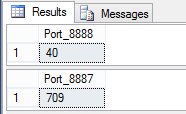
Running this in Microsoft SQL Server Management Studio, from a New Query window, you will get similar output to below image.

PortCountOutput_Query.png

I am showing 2 example outputs, but the python script is doing 100 iterations.

Jumping back to source Log files.

Depending on your device, check the top of the file. You will likely have some column headers, and in my case I had a line of ‘======’ characters. I find it easier to remove the header and 2nd line, then save the modified file as a new file.

Example log file header for Zyxel firewall:

Quote

Time ,Source ,Destination ,Priority ,Category ,Note ,Source Interface ,Destination Interface ,Protocol ,Message

========================================================================================================================================================================================================================================================================================

To save hassle on the import, I saved the modified files as zy(Year)-(Month) (IE: zy2016-09) as seen in the SQL code examples. These became my table names when I imported them into my database. By deleting the top two lines, the new file works as a clean csv to import.

What is the python doing?

I read a few books for python and read the online manual, but trying to format string output was driving me crazy. To save you some rage, my observations are that using print(“text”,variable,”rest of query line 1″) will always force a space to be inserted. This will not fly in SQL queries and you don’t want that hassle.

Trying to avoid vomit inducing code and searching around, I found that using stdout.write, lets you define the output spacing, followed by your variable values. It took me vastly longer than I would have liked to have figured this out, but considering generating database scripts was the main goal I had for learning python, I’m pretty excited this works. :)

The running python code is higher in the thread, but below I explain each line, with a # comment under each line.

Line for line breakdown to build the SQL Queries:

import sys
# import sys so we can use sys.stdout.write

pstartNum = int(input("Source Port number start: "))
# Asking to have the user (You) enter a start number.

q1 = "SELECT COUNT(*) AS Port_"
# Start of SQL Query, in this case we are getting a count, instead of a display of the values matching the query.

q2 = "FROM [dbo].[zy2016-09]"
# From portion of a SQL Query

qWat = "WHERE [Column 1] like '%:"
# Query for your search criteria.

qClose = "'"
# Close the SQL Query for the like string.

for x in range(100):
# Run this loop 100 times.

    sys.stdout.write("%s%s %s \n" % (q1, pstartNum, q2));
# The left side with %s placement, says grab the 1st part of the Select variable, Current iteration of loop, with a space added for the variable for 'FROM (tablename)'.

    sys.stdout.write("%s%s%s \n" % (qWat, pstartNum, qClose));
# Here the %s triple string placement is to have no spaces.  We call the Query, current iteration of the start number from the loop, and close the line with a "'".

    print("GO")
# Execute each query instead of waiting for all of them to complete.
    
    print()
# prints a blank line.  I saw some crazy code to do this by other means, but since all I want is a blank line, this is way easier and fits the bill.

    pstartNum = pstartNum - 1
# Once the 1st loop finishes, subtract 1 from the starting port number.  Do this for each iteration, by sayin that variable is equal to -1 from it's current state. (Please note you will error if you start with a port number less than 100.)

exit
# stops the 100 loop, so I can copy and paste this into my SQL query window and get results.

Remember this is a breakdown of the source code from the above 3rd post.

If you want this to run for 1000 iterations, change the for x in range(100) to for x in range(1000) or whatever works for you.

If you are not already doing this on your own equipment, you may anger some server admin with resource utilization. Or in the case of using Amazon Web Services or other hosting, your bill might get nasty expensive.

Table structure and Imports revisited

In the case of dealing with Zyxel logs, we are better off leaving the 1st line for headers, but removing the line of ‘=’ as shown in post #5. Once this line is removed, save the .log file and we can import the records into a table using MS SQL Import Wizard. This way, we know everything imported ok, and if it fails, most often it’s because your input column has more characters than your Column defined in the new database table.

In the case of a Zyxel firewall log, this table structure should match the log format and import without error. Here are the columns to a supported character import length:

[Time]   varchar(50)
[Source]   varchar(50)
[Destination]   varchar(50)
[Priority]   varchar(50)
[Category]   varchar(50)
[Note]   varchar(250)
[Source Interface]   varchar(50)
[Destination Interface]   varchar(50)
[Protocol]   varchar(50)
[Message]   varchar(450)

There would be some spaces padded into the inserted column names, but at least it would be consistent to what your source data is. You can edit the Design of the table after the import, since changing the column names will not break the data sets. In queries the spaces on the end seem to be ignored, so edit at your preference.
When doing the import, you can click advanced on the Flat File Source portion of the import and in Advanced, you can edit the OutputColumnWidth to match the listed VarChar parameters.